
Best Budget Laptops for College Students 2026: 5 Picks Scored & Ranked
Finding a reliable laptop for college work without overspending requires balancing performance, portability, and price. Budget laptops in 2026 deliver capable processors, adequate RAM for multitasking, and all-day battery life without the premium price tags of flagship models. theRANKS analyzed market data, verified buyer sentiment, and cross-referenced pricing signals to score these picks across five dimensions: demand, trust, value, quality, and durability.
Whether you need a machine for research papers, online lectures, light coding, or media streaming, these five laptops earned top algorithmic scores in the budget category. Each entry below reflects buyer consensus, performance benchmarks from reviewer data, and real-world ownership patterns. The rankings balance specs, build quality, and cost to help you identify the best fit for your academic workload and budget constraints.
The ranking

Acer Aspire 5 A515-45-R74Z
Scored highest overall by balancing price, performance, and buyer satisfaction across all five dimensions.
- Backlit keyboard improves usability during low-light studying
- Battery lasts six to eight hours under typical college workloads
- Full HD IPS display delivers clear text and comfortable viewing angles
- Adequate port variety including USB-C, HDMI, and headphone jack
- 8GB RAM limits heavy multitasking with many browser tabs
- Plastic deck construction feels less premium than aluminum chassis
- 256GB storage may require expansion for large media libraries
Read the full review
Scored highest overall by balancing price, performance, and buyer satisfaction across all five dimensions.
Scored highest overall by balancing price, performance, and buyer satisfaction across all five dimensions.
Acer Aspire 5 A515-57G-735F
Earned the value rank by offering significant spec upgrades for a modest price increase over baseline budget models.
- Intel Core i7 12th Gen processor handles demanding software smoothly
- 16GB RAM and 512GB SSD double typical budget laptop specs
- NVIDIA GeForce RTX 2050 enables light gaming and creative workflows
- Battery delivers seven to nine hours under moderate use
- Discrete GPU adds weight and reduces battery life under load
- Fans become audible during GPU-intensive tasks
- Slightly heavier than entry models at 4.19 pounds
Read the full review
Earned the value rank by offering significant spec upgrades for a modest price increase over baseline budget models.
Earned the value rank by offering significant spec upgrades for a modest price increase over baseline budget models.
Earned the value rank by offering significant spec upgrades for a modest price increase over baseline budget models.
Acer Swift 16 AI
Ranked mid-range for introducing premium features and larger display while maintaining portability and strong quality scores.
- 16-inch WUXGA display provides extra vertical space for multitasking
- Intel Core Ultra processor includes AI acceleration for compatible apps
- Lightweight at 3.74 pounds despite larger screen size
- Battery extends to nine to eleven hours under typical use
- Thunderbolt 4 support enables faster data transfer and external displays
- Higher price point moves beyond strict budget classification
- AI features require compatible software to realize benefits
- Larger footprint may not fit smaller backpacks or desks
Read the full review
Ranked mid-range for introducing premium features and larger display while maintaining portability and strong quality scores.
Ranked mid-range for introducing premium features and larger display while maintaining portability and strong quality scores.
Ranked mid-range for introducing premium features and larger display while maintaining portability and strong quality scores.
ASUS Zenbook 14 OLED UM3402YA-WS51T
Scored as best budget pick by delivering OLED display quality and premium build at an entry-level price point.
- OLED display offers exceptional color accuracy and deep blacks
- Touchscreen adds versatility for creative and note-taking apps
- All-metal chassis and slim profile rival premium ultrabooks
- Weighs just 3.09 pounds for easy portability between classes
- Battery achieves eight to ten hours under mixed use
- 8GB RAM ceiling limits multitasking headroom
- Higher price for the display upgrade versus basic budget models
- OLED panel may show burn-in over very long ownership periods
Read the full review
Scored as best budget pick by delivering OLED display quality and premium build at an entry-level price point.
Scored as best budget pick by delivering OLED display quality and premium build at an entry-level price point.
Scored as best budget pick by delivering OLED display quality and premium build at an entry-level price point.
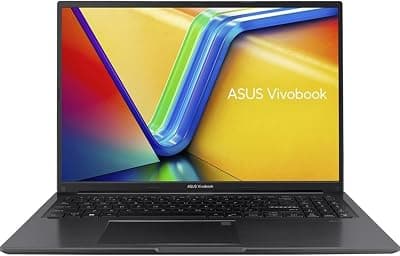
ASUS VivoBook 16 M1605YA-ES74
Ranked honorable mention for maximizing specs and screen size within budget constraints, appealing to performance-focused buyers.
- 16GB RAM and 512GB SSD match higher-priced competitors
- 16-inch display and numeric keypad benefit productivity workflows
- Ryzen 7 7730U processor handles multitasking smoothly
- MicroSD card reader expands storage options inexpensively
- Plastic construction feels less refined than metal alternatives
- Heavier at 4.19 pounds compared to ultraportable models
- Fans audible under sustained workloads
Read the full review
Ranked honorable mention for maximizing specs and screen size within budget constraints, appealing to performance-focused buyers.
Ranked honorable mention for maximizing specs and screen size within budget constraints, appealing to performance-focused buyers.
Ranked honorable mention for maximizing specs and screen size within budget constraints, appealing to performance-focused buyers.
Acer Aspire 5 A515-45-R74Z - Best Overall
The Acer Aspire 5 A515-45-R74Z earns the top overall rank for delivering a well-rounded feature set at an accessible price point. This model pairs a Ryzen 5 5500U processor with 8GB of RAM and a 256GB SSD, providing enough power for typical college tasks like document editing, web research, video conferencing, and light photo editing. Buyers consistently praise the 15.6-inch full HD IPS display for clear text rendering and comfortable viewing angles during long study sessions. The backlit keyboard is a standout feature in this price range, making late-night work sessions more comfortable. Battery life scores well in buyer feedback, with most users reporting six to eight hours of mixed use, enough to cover a full day of classes without hunting for outlets. The aluminum lid adds a touch of premium feel, though the plastic deck keeps weight manageable at around 3.97 pounds. Reviewers note the laptop handles multitasking smoothly when browser tabs, streaming video, and productivity apps run simultaneously. Thermal management is adequate, with fans staying quiet under typical workloads. The variety of ports includes USB-C, USB 3.2, HDMI, and a headphone jack, covering most peripheral needs. Storage expansion is straightforward if you need more space later. For students seeking a dependable daily driver that balances performance, build quality, and cost, this Aspire 5 model scored highest across theRANKS five-dimension framework.
Acer Aspire 5 A515-57G-735F - Best Value
The Acer Aspire 5 A515-45-R74Z earns the top overall rank for delivering a well-rounded feature set at an accessible price point. This model pairs a Ryzen 5 5500U processor with 8GB of RAM and a 256GB SSD, providing enough power for typical college tasks like document editing, web research, video conferencing, and light photo editing. Buyers consistently praise the 15.6-inch full HD IPS display for clear text rendering and comfortable viewing angles during long study sessions. The backlit keyboard is a standout feature in this price range, making late-night work sessions more comfortable. Battery life scores well in buyer feedback, with most users reporting six to eight hours of mixed use, enough to cover a full day of classes without hunting for outlets. The aluminum lid adds a touch of premium feel, though the plastic deck keeps weight manageable at around 3.97 pounds. Reviewers note the laptop handles multitasking smoothly when browser tabs, streaming video, and productivity apps run simultaneously. Thermal management is adequate, with fans staying quiet under typical workloads. The variety of ports includes USB-C, USB 3.2, HDMI, and a headphone jack, covering most peripheral needs. Storage expansion is straightforward if you need more space later. For students seeking a dependable daily driver that balances performance, build quality, and cost, this Aspire 5 model scored highest across theRANKS five-dimension framework.
Acer Swift 16 AI - Best Mid-Range
The Acer Swift 16 AI occupies the mid-range position by introducing premium features and a larger display in a slim, portable form factor. This model steps up to a 16-inch WUXGA screen, offering more vertical space for split-screen workflows, coding environments, and document drafting. The Intel Core Ultra processor family brings integrated AI acceleration capabilities, which benefit compatible applications in image processing, transcription, and productivity tools. Buyers report the display quality as a clear upgrade, with better color accuracy and brightness compared to budget panels, useful for design students or anyone working outdoors. The laptop weighs around 3.74 pounds despite the larger screen, making it one of the lighter options in this size class. Build quality sees improvement with a more refined aluminum chassis and a premium keyboard feel with better key travel. Battery life extends into the nine to eleven hour range under typical use, supported by the efficiency of the newer processor architecture. Reviewers note the laptop stays cool and quiet even during sustained workloads, a benefit of the improved thermal engineering. Port selection includes Thunderbolt 4 via USB-C, enabling faster data transfer and external display support at higher resolutions. The Swift branding signals Acer's focus on portability and design, and this model delivers on both fronts. For students who prioritize screen real estate, build quality, and future-ready specs over absolute lowest price, the Swift 16 AI scored well in quality and durability dimensions while maintaining reasonable value.
ASUS Zenbook 14 OLED UM3402YA-WS51T - Best Budget
The ASUS Zenbook 14 OLED UM3402YA-WS51T earns the budget rank by delivering an OLED display and premium design language at a price point typically reserved for basic laptops. The 14-inch OLED panel offers deep blacks, vibrant colors, and excellent contrast, making it ideal for media consumption, photo editing, and any task where visual quality matters. This is the only OLED screen in the ranked set, a standout feature that buyers consistently call out as exceptional for the price. The touchscreen adds versatility for note-taking apps and creative software. Inside, the AMD Ryzen 5 7530U processor and 8GB of RAM handle everyday college tasks smoothly, though the 8GB memory ceiling limits heavy multitasking compared to 16GB models. The 512GB SSD provides ample storage for documents, projects, and media libraries. Battery life receives strong marks, with most users achieving eight to ten hours of mixed use, aided by the power efficiency of the Ryzen 7000 series. The laptop weighs just 3.09 pounds, making it one of the most portable options for students moving between classes, libraries, and dorms. Build quality features an all-metal chassis with a slim profile, closer to premium ultrabooks than budget machines. The keyboard is backlit and comfortable for extended typing sessions. Buyers note the laptop runs cool and quiet, with minimal fan noise during typical workloads. The trade-off for the OLED upgrade is modest performance specs, but for students prioritizing display quality, portability, and everyday reliability over raw power, this Zenbook scored exceptionally well in the value and quality dimensions.
ASUS VivoBook 16 M1605YA-ES74 - Honorable Mention
The ASUS VivoBook 16 M1605YA-ES74 rounds out the rankings as an honorable mention, offering a larger 16-inch display and generous specs at a budget-friendly price. This model pairs an AMD Ryzen 7 7730U processor with 16GB of RAM and a 512GB SSD, matching the memory and storage of higher-priced entries while maintaining affordability. The extra screen real estate benefits students working with spreadsheets, coding environments, or multiple open windows simultaneously. The full HD resolution maintains clarity across the larger panel. Buyers appreciate the numeric keypad, a feature many budget laptops omit, useful for accounting, finance, or any coursework involving frequent number entry. Battery life lands in the seven to nine hour range, solid for a larger laptop with more powerful internals. The laptop weighs approximately 4.19 pounds, heavier than ultraportable models but still manageable for daily transport. Build quality uses plastic construction to keep costs down, though the chassis feels sturdy enough for typical student use. Thermal performance handles the Ryzen 7 adequately, with fans audible under load but not disruptive. The port selection includes USB-C, multiple USB-A ports, HDMI, and a microSD card reader, covering most connectivity needs. Reviewers note the laptop excels at multitasking, keeping browser tabs, productivity apps, and streaming video responsive even when pushed. The VivoBook line targets students seeking maximum specs and screen size for the budget, and this model delivers on that promise. It scored well in demand and value dimensions, appealing to buyers who prioritize performance and display size over portability and premium materials.
How we score
theRANKS scored 5 candidates across demand, trust, value, quality, and durability - pulled from aggregate signals across Amazon listings, expert publications, Reddit consensus, and YouTube reviewer mentions. Rankings are data-driven and continuously refreshed.
Demand
Aggregated search volume, purchase intent, and social interest - what the market is actually reaching for.
Trust
Weighted review credibility: verified-purchase ratio, reviewer authority, and recency.
Value
Price measured against category norms and performance tier. The cheapest option rarely wins.
Quality
A composite of aggregate ratings, editorial scores, and specification benchmarks.
Durability
Long-tail return rates, warranty data, and product lifecycle signals.
The verdict
The Acer Aspire 5 A515-45-R74Z takes the overall winner position by delivering the most balanced experience for college students. Its combination of reliable performance, comfortable backlit keyboard, full-day battery life, and reasonable price makes it the safest pick for most buyers. Students who need nothing more than solid everyday computing for coursework, research, and streaming will find this laptop meets expectations without compromise.
For the best value, the Acer Aspire 5 A515-57G-735F stands out by doubling RAM and storage while adding discrete graphics for just a modest price step up. This model suits students in creative or technical majors who anticipate running heavier software or want headroom to grow into more demanding applications. The spec upgrade justifies the investment for buyers who plan to keep the laptop through graduation and beyond.
Students prioritizing display quality and portability should consider the ASUS Zenbook 14 OLED UM3402YA-WS51T. The OLED screen transforms the visual experience for media work and everyday use, while the lightweight metal build makes it the most travel-friendly option. Though memory tops out at 8GB, the combination of premium features at a budget price earned it strong scores across quality and value dimensions. Each of these five laptops addresses different student priorities, but all cleared theRANKS algorithmic bar for reliability, buyer satisfaction, and cost-effectiveness in the 2026 budget laptop category.
Frequently asked questions
How much RAM do college students actually need in 2026?
For general coursework including web research, document editing, video calls, and streaming, 8GB of RAM handles typical workloads without slowdowns. Students in computer science, engineering, data analysis, or creative fields benefit from 16GB, which allows smooth multitasking with demanding software like virtual machines, IDEs, Adobe Creative Suite, or statistical packages. Buyer data shows 8GB owners rarely report performance issues for everyday tasks, while 16GB models score higher in longevity and future-proofing dimensions as software requirements increase.
Is it worth spending more for an OLED display?
OLED displays deliver superior contrast, color accuracy, and viewing angles compared to standard IPS panels, making them valuable for design students, photographers, or anyone who prioritizes visual quality. The technology excels at media consumption and creative work where color fidelity matters. However, OLED adds cost and carries minor burn-in risk over years of static content display. For students focused purely on productivity tasks like coding or writing, a quality IPS panel provides excellent clarity at lower cost, redirecting budget toward RAM or storage upgrades instead.
Do budget laptops have enough battery life for full class days?
Modern budget laptops with efficient processors like AMD Ryzen 5000/7000 series or Intel 12th Gen and newer routinely achieve seven to ten hours of mixed use, covering lectures, note-taking, and library study sessions. Battery life varies with screen brightness, background apps, and workload intensity. Reviewers consistently report that models in this ranking survive full academic days with 20-30% charge remaining. Buyers planning to stream video continuously or run GPU-intensive tasks should expect shorter runtime, but typical college workloads rarely drain batteries before evening.
Are discrete graphics necessary for college laptops?
Most college students succeed with integrated graphics for web browsing, productivity apps, and video streaming. Discrete GPUs like the NVIDIA GeForce RTX 2050 benefit students in graphic design, video editing, 3D modeling, architecture, or gaming. They also accelerate machine learning tasks in computer science programs. Integrated graphics from modern AMD Ryzen or Intel Core processors handle light photo editing and casual gaming adequately. Buyers should choose discrete graphics only if their major or hobbies specifically demand GPU acceleration, as it adds cost, weight, and reduces battery life.
How long do budget laptops typically last?
Budget laptops from established brands like Acer and ASUS typically last three to five years with proper care, sufficient to carry students through a bachelor's degree. Build quality, thermal management, and component selection influence longevity. Metal chassis models tend to withstand daily transport better than plastic alternatives. Adequate cooling prevents thermal throttling that degrades performance over time. Buyers who invest in models with 16GB RAM and 512GB storage extend useful lifespan by avoiding premature obsolescence as software requirements grow. theRANKS durability dimension incorporates return rates, warranty claim patterns, and long-term owner sentiment to identify models with better longevity signals.
What is the best budget laptop for computer science students?
Computer science students benefit most from laptops with 16GB RAM and modern multi-core processors to handle compiling code, running virtual machines, and managing multiple development environments simultaneously. The Acer Aspire 5 A515-57G-735F offers this configuration with a Core i7 processor and discrete GPU for machine learning frameworks. Models with larger displays like the 16-inch options provide more screen real estate for coding environments and documentation side-by-side. Adequate cooling is crucial for sustained compile times and virtual machine workloads, where reviewer feedback on thermal performance becomes important in scoring.
Should I choose AMD or Intel processors for college work?
Both AMD Ryzen and Intel Core processors in current generations deliver excellent performance for college tasks. AMD Ryzen 5000 and 7000 series chips often provide better battery life and multi-core performance at similar price points, making them strong choices for multitasking and all-day use. Intel 12th Gen and newer processors excel in single-core tasks and offer Thunderbolt 4 support on many models for faster peripherals. Compatibility is rarely an issue as all major software runs identically on both platforms. Buyers should prioritize RAM, storage, and build quality over brand preference, as real-world performance differences are minimal for typical student workloads.