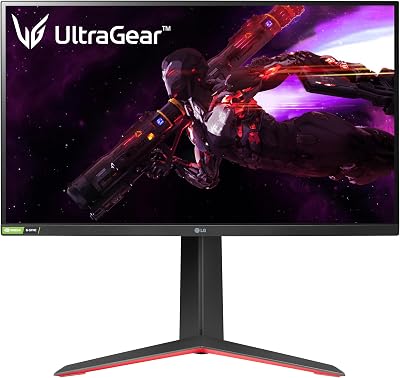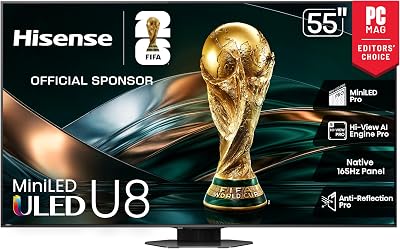
Head-to-Head
Gaming Monitor vs TV: Which Display Is Worth Your Money in 2026
Monitors own the speed advantage for competitive play, but TVs deliver scale and versatility for casual sessions.
// KEY TAKEAWAYSWhat to know
- Gaming monitors deliver response times under 2ms and input lag below 5ms, while premium TVs typically range from 10-30ms even in game mode.
- Gaming monitors lead market growth as esports and streaming expand display-performance requirements.
- TVs excel for casual gaming and couch co-op with larger screens, built-in HDR support, smart systems, and integrated speakers.
- Modern TVs have much higher response times than monitors, with casual gamers accepting 10ms while competitive players target 1ms.
- Monitors cost more per inch but justify the premium with performance-focused features tailored for desk setups and fast-reaction gaming.
For serious gamers, every millisecond counts, especially in fast-paced titles like Counter-Strike 2, Valorant, or Apex Legends where a fraction of a second can mean the difference between victory and defeat. The choice between a gaming monitor and a TV now defines two distinct paths: one optimized for competitive edge, the other built for versatility and scale. Response time and input lag separate these categories more decisively than resolution or screen size. Gaming monitors lead market growth as esports and streaming expand display-performance requirements. Understanding which display type aligns with your play style, space, and budget determines whether you invest in a fast, focused monitor or a large, feature-rich TV that doubles as your entertainment hub.
Response Time: Where Monitors Pull Ahead
Key takeaway - Monitors deliver sub-2ms response and input lag under 5ms, while TVs typically range 10-30ms even in game mode, a gap that defines competitive performance.
Most high-end gaming monitors advertise response times under 1ms and input lag below 5ms, while even premium TVs typically range from 10-30ms in game mode. TN panels maintain the fastest native response times, with modern gaming monitors achieving 0.5ms to 1ms transitions, and these high-performance displays remain the gold standard for competitive esports where every millisecond matters. OLED response time has become the defining advantage for competitive gamers in 2026 because its near-instant pixel transitions remove the smearing that still limits LCD panels even at very high refresh rates. One of the main advantages of playing console games on a monitor instead of a TV is the improved input lag, as TVs tend to rely heavily on filters that improve image quality when watching TV but this takes extra time and translates into input lag. For players who demand the tightest possible connection between controller input and screen action, the best gaming monitors we ranked deliver pixel transitions fast enough to eliminate ghosting in flick shots and fast camera pans.
Gaming Monitors: Built for Competitive Edge
Key takeaway - Monitors dominate competitive play with desk-friendly sizing, adjustable stands, and panel tech that pairs 1-4ms response with high refresh rates and low lag.
Monitors are best for competitive gamers who prioritize performance, with higher refresh rates, lower response times, and near-zero input lag offering a crisp and highly responsive experience. IPS panels have undergone revolutionary improvements, with Fast IPS and Nano IPS technologies now delivering 1ms to 4ms response times, making these balanced gaming monitors combine excellent color accuracy with respectable speed for diverse gaming needs. Desk setups benefit from the compact form factor and adjustable stands that position the screen at eye level, reducing neck strain during long sessions. OLED monitor shipments have risen sharply compared with a year earlier, and Trendforce reckons increased supply of Samsung's QD-OLED panels is a key factor. Gaming monitors ranked by theRANKS score highest when refresh rate and response time align with panel type, creating the motion clarity that defines competitive advantage in twitch shooters and fast MOBAs.
TVs: Scale and Versatility for Casual Play
Key takeaway - TVs win for casual and co-op play with large screens, built-in smart features, and HDR, though higher input lag limits competitive suitability.
TVs are perfect for casual gaming, home entertainment, and shared experiences, with larger screens and built-in features such as HDR support, smart operating systems, and integrated speakers making them ideal for immersive single-player games, couch co-op sessions, or movie nights with friends and family. Opt for models offering ultra-low input lag modes, ideally under 15ms for competitive gaming. Game Mode is a setting that optimizes a TV's performance for gaming, and it usually turns off motion-smoothing settings and pumps up the brightness and color saturation. The all-in-one nature of modern TVs eliminates the need for external speakers or streaming boxes, simplifying living-room setups. While TVs offer a more versatile all-in-one solution, their higher input lag and lower pixel density make them less suitable for competitive gaming or close-up tasks. For players who split time between story-driven adventures and group gaming sessions, the best TVs we ranked balance picture quality, smart features, and game-mode performance without the desk-space requirements of a dedicated monitor.
Price Per Inch: The Monitor Premium
Key takeaway - Monitors command a price premium per inch but deliver pixel density, refresh rates, and response speed that justify the cost for desk-based competitive play.
This price disparity arises from the specialized features of gaming monitors, such as high refresh rates, fast response times, and higher pixel density designed for close-up viewing, though monitors often justify their price with performance-focused features tailored for gaming. Premium-priced monitors above USD 500 now account for roughly one-quarter of unit sales and a substantially larger share of revenue, as OLED and Mini-LED backlighting move from niche to mainstream and as hybrid work-gaming use cases drive demand for larger, higher-resolution displays. A 27-inch gaming monitor costs significantly more than a 43-inch TV, but the monitor delivers higher pixel density, faster refresh, and lower lag for the desk distance where competitive players sit. With 2026 dropping minimum OLED pricing to the 350-400 dollar range, these monitors are more affordable than ever. Budget-conscious buyers who prioritize screen size over milliseconds will find better value in a TV, while performance-first players accept the premium for the speed advantage that defines top-ranked gaming monitors.
Use Case: Where Each Display Wins
Key takeaway - Monitors win for solo competitive play at desks; TVs dominate couch co-op, casual sessions, and multi-use setups that blend gaming with entertainment.
Professional players prioritize consistency and predictability, with a 1ms monitor with stable timing beating a flashy 85-inch TV with inconsistent frame delivery. Competitive esports players, solo-queue grinders, and anyone who sits at a desk benefits from the monitor's tight response and ergonomic adjustability. TVs are perfect for casual gaming, home entertainment, and shared experiences, with larger screens and built-in features making them ideal for immersive single-player games, couch co-op sessions, or movie nights. Demand segments range from competitive esports players who prioritize refresh rate and response time, to immersive single-player gamers who seek resolution and HDR performance, to hybrid users who split screen time between gaming and professional workloads. For families or multi-genre players who want one screen to handle everything from ranked shooters to split-screen racing and streaming, a TV with a strong game mode balances performance and practicality. The choice between gaming on a TV vs a monitor depends on the user's gaming style and setup.
The takeaway
Modern TVs have much higher response times than monitors, with casual gamers happy with a response time of about 10 milliseconds while competitive and professional gamers usually target something closer to 1 millisecond. For most buyers in 2026, the verdict splits cleanly: if you play competitive shooters, MOBAs, or any title where reaction time defines outcomes, a gaming monitor delivers the 1-2ms response and sub-5ms input lag that TVs cannot match even in game mode. If your priority is couch co-op, story-driven single-player games, or a single screen that handles Netflix and party racing equally well, a TV wins on scale, features, and value per inch. Hybrid players who want both paths should invest in a monitor for ranked sessions and keep a TV for casual living-room play. Ready to decide? Start with the best gaming monitors we ranked for competitive edge, or explore the best TVs we scored for versatile, large-screen gaming.
the best gaming monitors we ranked
Read the ranking// FREQUENTLY ASKEDQuick answers
- What is the main performance difference between gaming monitors and TVs?
- Most high-end gaming monitors advertise response times under 1ms and input lag below 5ms, while even premium TVs typically range from 10-30ms in game mode. This gap translates to faster pixel transitions and tighter controller-to-screen responsiveness on monitors, which matters most in competitive, reaction-based titles where milliseconds determine outcomes.
- Do TVs work well for competitive gaming?
- While TVs offer a more versatile all-in-one solution, their higher input lag and lower pixel density make them less suitable for competitive gaming or close-up tasks. Opt for models offering ultra-low input lag modes, ideally under 15ms for competitive gaming. TVs can handle casual competitive play when game mode is enabled, but serious esports players will notice the lag difference compared to monitors.
- How much does a good gaming monitor cost in 2026?
- Premium-priced monitors above USD 500 now account for roughly one-quarter of unit sales and a substantially larger share of revenue, as OLED and Mini-LED backlighting move from niche to mainstream. With 2026 dropping minimum OLED pricing to the 350-400 dollar range, these monitors are more affordable than ever. Entry-level 1080p models start lower, while high-refresh 1440p and 4K OLED panels command the premium.
- Which panel type is fastest for gaming monitors?
- TN panels maintain the fastest native response times, with modern gaming monitors achieving 0.5ms to 1ms transitions, and remain the gold standard for competitive esports where every millisecond matters. OLED response time has become the defining advantage for competitive gamers in 2026 because its near-instant pixel transitions remove the smearing that still limits LCD panels even at very high refresh rates.
- Are gaming monitors worth the price premium over TVs?
- The price disparity arises from specialized features of gaming monitors, such as high refresh rates, fast response times, and higher pixel density designed for close-up viewing, though monitors often justify their price with performance-focused features tailored for gaming. If competitive performance is your priority, the premium delivers measurable speed advantages. For casual or multi-use setups, a TV offers better value per inch.
- Can I use a TV at my desk for gaming?
- You can, but pixel density drops at desk viewing distances and input lag rises compared to monitors. A 27-inch 4K monitor has a much higher pixel density than a TV, and higher pixel density ensures that the enhanced resolution delivers a noticeably sharper and more detailed image. TVs also lack the ergonomic stands and compact sizing that make monitors ideal for close-range desk setups.
- What is game mode on a TV and does it help?
- Game Mode is a setting that optimizes a TV's performance for gaming, and it usually turns off motion-smoothing settings and pumps up the brightness and color saturation. Game Mode often cuts input lag in half, from 50ms to 15-20ms on average. Enabling it is essential for any gaming on a TV, though it still leaves lag higher than most dedicated monitors.
- Which display is better for couch co-op gaming?
- TVs are perfect for casual gaming, home entertainment, and shared experiences, with larger screens and built-in features such as HDR support, smart operating systems, and integrated speakers making them ideal for couch co-op sessions or movie nights with friends and family. The scale, distance, and all-in-one nature of TVs make them the clear winner for living-room multiplayer and group play.
- Is OLED worth it for gaming monitors in 2026?
- OLED response time has become the defining advantage for competitive gamers in 2026 because its near-instant pixel transitions remove the smearing that still limits LCD panels even at very high refresh rates. OLED monitor shipments have risen sharply compared with a year earlier. With 2026 dropping minimum OLED pricing to the 350-400 dollar range, these monitors are more affordable than ever. For competitive players, OLED delivers the motion clarity advantage that justifies the cost.